Office lighting quietly shapes how people read, focus, and recover during long workdays. Color temperature, measured in Kelvin, describes whether light appears warm and yellow or cool and blue. Warm light can create a relaxed atmosphere, while cooler light may support alertness during detailed tasks. Yet brighter is not always better.
This guide explores how to choose color temperature for office productivity without treating one setting as universally perfect. In real offices, a 4000K neutral-white lamp may make spreadsheets feel clearer, while a 3000K desk light can feel more comfortable during late writing sessions. Personal vision, screen brightness, wall colors, window exposure, and task demands all matter. Small adjustments often produce noticeable changes.
Professional lighting guidance generally favors balanced, low-glare illumination rather than extreme blue or yellow tones. Research on light and alertness offers useful direction, but workplace results vary. Some employees report sharper focus under cooler light; others experience eye strain, headaches, or restlessness. That difference deserves attention. A practical approach combines established recommendations with direct observation: change one variable, track comfort and concentration, then reassess after several days. The ideal office is rarely created by a single number. It is shaped through testing, measurement, and feedback from the people using the space. This article will help readers compare practical options and make a more informed lighting decision.
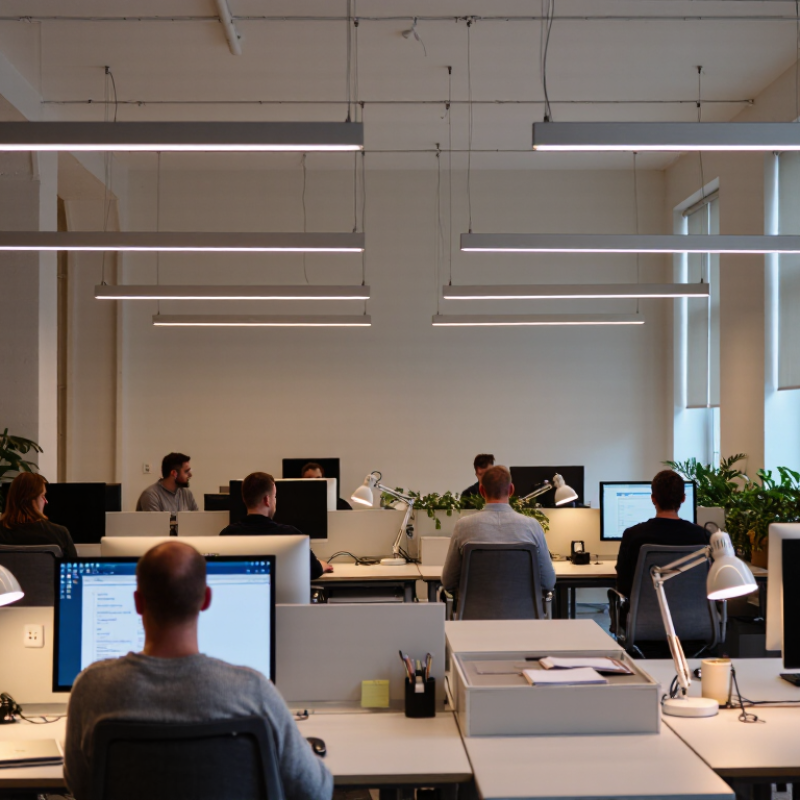
Why Choose Color Temperature for Office Productivity?
Understanding color temperature in office lighting starts with the Kelvin scale. Lower values, such as 2700K to 3000K, produce warm, amber-like light. This tone can make reception areas and quiet lounges feel comfortable. Neutral light around 3500K to 4000K often suits desks, meeting rooms, and shared workspaces. It keeps white surfaces clear without feeling overly clinical. Higher settings, near 5000K, appear cooler and more daylight-like. They may help workers feel alert during detailed morning tasks.
In real offices, the best choice depends on the room, schedule, and people using it. A designer may select neutral light for computer work, then reduce brightness near the end of the day. Glare matters as much as color temperature. A cool lamp can still cause eye strain when it reflects across a monitor. Good practice includes diffusers, adjustable controls, and careful fixture placement. The color rendering index also deserves attention because accurate colors support design, inspection, and document work.
There is no perfect setting.
I have seen teams blame lighting when screen brightness was the real problem. I have also found that personal preference can challenge technical recommendations. Some employees feel focused under cooler light, while others become tense. Testing two settings for several days can reveal useful patterns. Record complaints, concentration changes, and afternoon fatigue. The result may be less dramatic than expected, but it is usually more trustworthy than guessing.
Color temperature shapes how alert and comfortable people feel at work. Warm light, around 2700–3000K, creates a calm atmosphere. It may suit reading, creative work, or late-day meetings. Cooler light, around 4000–5000K, often feels brighter and more stimulating. This can support attention during detailed tasks.
In my own workspace, I noticed a cooler lamp helped me stay focused during spreadsheet work. My eyes felt more awake at 10 a.m. The same setting felt harsh after sunset. That assumption was too simple. Brightness, glare, screen reflections, and sleep habits also affect concentration. Color temperature cannot repair poor lighting design.
Lighting research connects short-wavelength-rich light with alertness and circadian timing. However, individual responses vary considerably. Some employees may feel productive under neutral white light, while others prefer a softer tone. A practical office trial can compare 3000K, 4000K, and 5000K settings. Track errors, task completion, eye comfort, and afternoon fatigue for several days. Ask workers about headaches and visual strain. Small observations matter. Natural daylight should also be considered, since its intensity changes throughout the day. Adjustable fixtures may support changing needs, but frequent changes can become distracting. The most reliable choice balances measured performance with human comfort, not color temperature alone.
Why Choose Color Temperature for Office Productivity?
Choosing Color Temperature for Different Office Tasks
Color temperature should match the task, not personal preference alone. For reading, writing, and spreadsheet work, 3500K to 4000K often gives a balanced appearance. Text stays clear without making the room feel clinical. The Illuminating Engineering Society commonly recommends about 300–500 lux for office work, depending on visual difficulty and user age. A bright desk needs control. Too much glare can cancel the benefit.
Use cooler light, around 4000K to 5000K, for detailed analysis, coding, and short periods of concentrated work. The International Commission on Illumination identifies melanopic light as important for non-visual responses, including alertness. Yet cooler light is not automatically better. A 2022 review in Building and Environment found that alertness responses vary with timing, intensity, and individual sensitivity. The evidence is useful, but not perfectly predictable.
Warmer light, near 2700K to 3000K, suits quiet rooms, informal discussions, and late-day work. It can soften faces during meetings and reduce an overly sterile mood. The WELL Building Standard also emphasizes daylight and circadian-supportive lighting, rather than color temperature alone. In practice, test two settings for one week. Ask whether eyes feel dry, screens look harsh, or concentration fades after lunch. My first setting is rarely perfect. Glare, poor dimming, and blue-tinted walls can distort the result.
Color temperature shapes how an office feels, but comfort should lead productivity decisions. Cooler light near 4000–5000K can make paper, screens, and room edges appear clearer. Warmer light near 2700–3500K often feels calmer during discussions or late work. The Illuminating Engineering Society recommends roughly 300–500 lux for common office tasks, while glare control remains equally important. Bright light is not automatically better light.
The CIE S 026:2018 framework measures biological light through melanopic effects, rather than color temperature alone. WELL Building Standard v2 guidance uses 150 equivalent melanopic lux at 75% of workstations during daytime hours. That target supports daytime alertness, yet it does not promise higher output for every employee. A 2022 review in Lighting Research & Technology also reported mixed evidence linking dynamic office lighting with performance. The science is useful, but not perfectly settled.
Practical testing matters. Place a 4000K fixture above a desk, then check screen reflections, facial shadows, and eye strain after two hours. Use warmer settings in meeting zones. Keep task areas brighter than rest areas, without creating sharp contrasts. One mistake is treating all workers alike. Some employees prefer 3500K, while others feel sluggish under it. A small pilot, paired with anonymous comfort surveys and task-error tracking, can reveal more than a fixed specification. I would still question short trials; novelty can look like productivity.
| Color Temperature | Visual Appearance | Typical Office Use | Potential Productivity Benefits | Comfort Considerations | Recommended Workplace Strategy |
|---|---|---|---|---|---|
| 2,700–3,000 K | Warm white with a yellow-to-amber appearance | Breakout areas, lounges, hospitality-style spaces, and informal meeting zones | Creates a relaxed atmosphere that can support conversation, recovery, and less formal collaboration | May feel too dim or visually soft for detailed reading, prolonged screen work, or precision tasks | Use as an accent or localized setting rather than the primary light source for task areas |
| 3,000–3,500 K | Soft neutral white with a slightly warm appearance | Private offices, reception areas, general administrative work, and conference rooms | Balances a welcoming environment with adequate visual clarity for routine office activities | Generally comfortable for many users; insufficient illumination or poor distribution can still cause eye strain | A practical choice for mixed-use offices when the lighting layout provides even, low-glare illumination |
| 3,500–4,100 K | Balanced neutral white | Open-plan workstations, shared offices, training rooms, and everyday computer-based work | Supports clear visual perception while avoiding the overly cool appearance that some users find uncomfortable | Often a strong compromise between alertness and visual comfort; individual preferences may vary | Use as a default range for general offices, combined with adjustable task lighting where possible |
| 4,100–5,000 K | Cool neutral white with a clean, crisp appearance | Detailed document work, design studios, technical workrooms, and high-focus task areas | Can improve perceived alertness and make contrast-sensitive visual tasks feel clearer during daytime work | Excessive brightness, glare, or a strong blue-white appearance may increase discomfort for sensitive users | Apply with glare control, suitable screen positioning, and access to warmer or dimmable settings |
| 5,000–6,500 K | Daylight-like white with a distinctly cool appearance | Specialized inspection, color evaluation, clinical-style environments, and selected daytime task areas | Provides a bright, high-contrast visual impression that can support specific inspection and concentration tasks | May appear harsh in general offices; high short-wavelength output and glare require careful design and user control | Reserve for task-specific applications and avoid using it as an inflexible setting throughout the entire workday |
Office lighting should change with the workday, not remain fixed above every desk. In the morning, cooler white light around 4,000–5,000K can support alertness and visual clarity. During focused tasks, pair it with approximately 500 lux, the office-work benchmark in EN 12464-1. Watch the glare. Bright reflections on monitors can create fatigue, even when the measured light level looks correct.
By early afternoon, maintain a neutral setting near 4,000K and reduce excessive brightness near windows. The World Green Building Council’s Health, Wellbeing and Productivity in Offices report links better lighting with an 11% potential productivity improvement. That figure is useful, but it is not a promise. Results depend on task type, daylight, age, screen use, and personal preference.
Late in the day, gradually shift toward 3,000–3,500K when possible. This warmer setting can make the office feel less harsh as natural daylight fades. CIE S 026/E:2018 advises evaluating light by its biological effects, not color temperature alone.
A practical trial could compare two work zones for four weeks, tracking errors, reported eye strain, and completed tasks. Ask employees for feedback, too. The first setting may be wrong. Adjust slowly, because dramatic changes can distract people instead of helping them.
Cooler light, around 4000–5000K, can feel brighter and support detailed tasks. It may help with spreadsheets, coding, and analysis. Not always. Individual responses vary.
Neutral light around 3500–4000K often keeps text clear and comfortable. It can feel less clinical than very cool light. Control glare on the desk and screen.
Warm light near 2700–3000K suits quiet rooms, informal meetings, and late-day work. It can soften faces and reduce a harsh atmosphere. Comfort matters more than a fixed number.
Cooler white light around 4000–5000K may support morning alertness. Use it with balanced brightness, not maximum brightness. Monitor reflections can still cause tired eyes.
Around 300–500 lux often suits ordinary office work. More difficult tasks may need brighter, controlled lighting. A bright desk is not automatically a comfortable desk.
Yes, gradual changes may match natural daylight and changing work demands. Use neutral light in the afternoon, then consider 3000–3500K later. Sudden changes can distract people.
It may support alertness for some people during concentrated work. However, fatigue also depends on sleep, screens, glare, and daylight. Color temperature cannot fix poor lighting design.
Compare two or three settings for several days or weeks. Track errors, completed tasks, eye strain, headaches, and afternoon fatigue. Ask employees what they notice. My first setting is rarely perfect.
Color temperature is an important part of effective office lighting because it affects how people see, feel, and work throughout the day. Understanding the difference between warmer and cooler light can help employees create an environment that supports concentration without causing unnecessary eye strain. Cooler, brighter light may encourage alertness and focus during demanding tasks, while warmer light can create a calmer atmosphere for discussions, reading, or creative activities.
Knowing how to choose color temperature for office productivity means matching lighting to the task, time of day, and comfort needs of the people using the space. Workstations may benefit from a more stimulating setting, while meeting areas and relaxation zones may require softer illumination. Adjustable lighting can also support changing needs, using brighter, cooler light during periods of intense concentration and warmer light later in the day. By balancing visual comfort with task requirements, offices can promote productivity, reduce fatigue, and create a more adaptable workplace.
